Geofences
Table of Contents
Prerequisites
This guide assumes the following:
Introduction
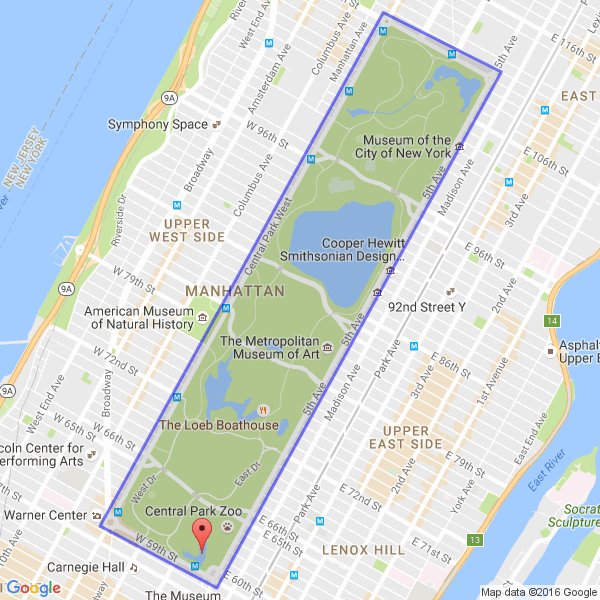
A Geofence is a geographic boundary, described as a polygon formed by a series of points. Each point is represented by coordinates of latitude and longitude. For example, this is a geofence that surrounds Central Park:
Defining Geofences
Each Geofence is composed of a name and a list of points. The first line of the description must be the name, surrounded by square brackets. The points of the Geofence follow, each as a pair of coordinates on a separate line. The Geofence around Central Park would be described as follows:
[Central Park]
40.801206,-73.958520
40.767827,-73.982835
40.763798,-73.972808
40.797343,-73.948385
In this case, the name is Central Park and it has 4 points, one for each
corner of the park. There are no limits on how big your geofence can be, but do
note that additional points may require increase processing time.
If using multiple geofences, they must be listed consecutively, with no empty spaces.
Filtering on Geofences
Note
In order to filter by a geofence, you must load a file describing your geofences. See the Managers page for specifics.
Using the "geofence" restriction, you can filter events by requiring them to
be located inside one of the geofences you have defined:
"geofence example": {
    "geofence": [ "Central Park", "Geofence #2", "Geofence #3" ]
}
Note
An event is only compared to a Geofence if it is listed in the filter. This means that PA does not waste time checking unlisted geofences, but also means the <geofence> DTS doesn’t work unless you have a geofence restriction specified.
You can also use the "all" shortcut, if you have a large number of
geofences and find it cumbersome to list them all. It is equivalent to listing
every Geofence attached to a Manager:
"geofence example": {
    "geofence": [ "all" ]
}
Notes
Differences from scanners
If you are using the same Geofences for both the scanner and PokeAlarm, it’s possible that you may see an event get rejected by PokeAlarm. This is because the scanner and PA could use Geofences differently. The scanners use them to restrict work movement but PA uses them to restrict events. As a result, the scanners could occasionally send an Event that PA will reject. If this is a problem, you can either increase the size of your PA geofences, or remove them all together.