Discord
Table of Contents
Prerequisites
This guide assumes
- You are familiar with JSON formatting.
- You have read and understood the Alarms wiki.
- You are comfortable with the layout of
alarms.json. - You are using the latest version of PokeAlarm.
Please familiarize yourself with all of the above before proceeding.
Introduction
Discord is a free voice and text chat app designed specifically for gaming. Available on Windows, Mac OS X, iOS and Android. It is also usable from any Chrome, Firefox or Opera browser.
PokeAlarm offers the following for Discord:
- Custom username for posting
- High resolution icons for pokemon, gym, pokestop, egg or raid notifications
- Personalized notifications via Events
Basic Config
Required Parameters
The parameters below are required to enable the Discord alarm service:
| Parameters | Description |
|---|---|
| type | Must be "discord" |
| active | true for alarm to be active |
| webhook_url * | Your Webhook URL for a specific channel |
Note
*In PokeAlarm version 3.1, webhook_url replaced api_key.
Example: Basic Alarm Configuration using Required Parameters
Note
The above below is to be inserted into the alarms section of alarms.json. It does not represent the entire alarms.json file.
{
      "active":true,
      "type":"discord",
      "webhook_url":"YOUR_WEBHOOK_URL"
}
Advanced Config
Optional Parameters
In addition to the required parameters, several optional parameters are available to personalize your notifications. Below is an example of these optional parameters and how they are incorporated into a functional alarm layout.
These optional parameters are entered at the same level as "type":"discord".
| Parameters | Description | Default |
| startup_message | Confirmation post when PokeAlarm initialized | true |
| startup_text | Custom message post when PA initialized | |
| disable_embed | Remove embed from message | false |
These optional parameters below are applicable to the monsters, stops,
gyms, eggs, and raids sections of the JSON file.
Note
Nidorans will be nidoranf or nidoranm, Farfetch’d will be
farfetchd, and Mr. Mime will be mrmime.
Example: Alarm Configuration Using Optional Parameters
Note
The code below is to be inserted into the alarms section of
alarms.json. It does not represent the entire alarms.json file.
{
  "discord_alarm":{
    "active":true,
    "type":"discord",
    "webhook_url":"YOUR_WEBHOOK_URL",
    "startup_message":false,
    "monsters":{
        "webhook_url":"YOUR_WEBHOOK_URL_FOR_POKEMON_CHANNEL",
        "username":"<mon_name>",
        "icon_url*":"YOUR CUSTOM URL HERE/<mon_id_3>_<form_id_3>.png",
        "title":"A wild <mon_name> has appeared!",
        "url":"<gmaps>",
        "body":"Available until <24h_time> (<time_left>)."
    },
    "stops":{
        "webhook_url":"YOUR_WEBHOOK_URL_FOR_POKESTOP_CHANNEL",
        "username":"Pokestop",
        "icon_url*":"YOUR CUSTOM URL HERE/ready.png",
        "title":"Someone has placed a lure on a Pokestop!",
        "url":"<gmaps>",
        "body":"Lure will expire at <24h_time> (<time_left>)."
    },
    "gyms":{
        "webhook_url":"YOUR_WEBHOOK_URL_FOR_GYM_CHANNEL",
        "username":"<new_team> Gym Alerts",
        "icon_url*":"YOUR CUSTOM URL HERE/<new_team_id>.png",
        "title":"A Team <old_team> gym has fallen!",
        "url":"<gmaps>",
        "body":"It is now controlled by <new_team>."
    },
    "eggs":{
        "webhook_url":"DISCORD_WEBHOOK_URL_FOR_EGG_CHANNEL",
        "username":"Egg",
        "icon_url*":"YOUR CUSTOM URL HERE/<egg_lvl>.png",
        "avatar_url*":"YOUR CUSTOM URL HERE/<egg_lvl>.png",
        "title":"Raid is incoming!",
        "url":"<gmaps>",
        "body":"A level <egg_lvl> raid will hatch at <24h_hatch_time> (<hatch_time_left>)."
    },
    "raids":{
        "webhook_url":"DISCORD_WEBHOOK_URL_FOR_RAID_CHANNEL",
        "username":"Raid",
        "icon_url*":"YOUR CUSTOM URL HERE/<mon_id_3>_000.png",
        "avatar_url*":"YOUR CUSTOM URL HERE/<mon_id_3>_000.png",
        "title":"Level <raid_lvl> Raid is available against <mon_name>!",
        "url":"<gmaps>",
        "body":"The raid is available until <24h_raid_end> (<raid_time_left>)."
    },
    "invasions":{
        "webhook_url":"DISCORD_WEBHOOK_URL_FOR_INVASION_CHANNEL",
        "username":"Invasion",
        "icon_url*":"YOUR CUSTOM URL HERE/<grunt_id>_<gender_id>.png",
        "avatar_url*":"YOUR CUSTOM URL HERE/<grunt_id>_<gender_id>.png",
        "title":"This Pokestop has been invaded by Team Rocket!",
        "url":"<gmaps>",
        "body":"Invasion will expire at <24h_time> (<time_left>)"
    },
    "quests":{
        "webhook_url":"DISCORD_WEBHOOK_URL_FOR_INVASION_CHANNEL",
        "username":"Quest",
        "icon_url*":"YOUR CUSTOM URL HERE/<quest_image>.png",
        "avatar_url*":"YOUR CUSTOM URL HERE/<quest_image>.png",
        "title":"This Pokestop has a new quest!",
        "url":"<gmaps>",
        "body":"Quest requirements: <quest_condition>\nReward: <reward>"
    }
  }
}
Note
*THESE LINES ARE USED TO OVERRIDE DEFAULT VALUES. IF YOU DO NOT WISH TO USE CUSTOM IMAGES, DO NOT ADD THESE LINES TO YOUR ALARMS.JSON.
Example: Alarm Configuration Using Fields
Note
The code below is to be inserted into the alarms section of
alarms.json. It does not represent the entire alarms.json file.
{
  "discord_alarm":{
    "active":true,
    "type":"discord",
    "webhook_url":"YOUR_WEBHOOK_URL",
    "startup_message":false,
    "monsters":{
        "webhook_url":"YOUR_WEBHOOK_URL_FOR_POKEMON_CHANNEL",
        "username":"<mon_name>",
        "icon_url*":"YOUR CUSTOM URL HERE/<mon_id_3>_<form_id_3>.png",
        "title":"A wild <mon_name> has appeared!",
        "url":"<gmaps>",
        "body":"Available until <24h_time> (<time_left>).",
        "fields": [
            {
                "name": "Detailed Information",
                "value": "<mon_name> <cp>...",
                "inline": true
            },
            {
                "name": "More information",
                "value": "<iv_0> <form>",
                "inline": true
            },
            {
                "name": "Costume",
                "value": "<costume>"
            }
        ]
    }
  }
}
Note
Fields are always defined with the name and value keys, with the inline key being optional and defaulting to false
Mini Map Configuration
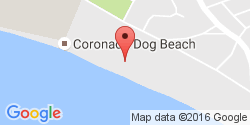
You can enable a small Google Static Maps image after your post, showing the
location of the alarmed pokemon, gym, pokestop, egg, or raid. This is done by
adding the map parameter at the Alarm level (which will apply maps for any
notification), or individually to the monsters, stops, gyms,
eggs, or raids sections of your alarm.
Below is an example of enabling the mini map for pokemon.
"monsters":{
        "webhook_url":"YOUR_WEBHOOK_URL_FOR_POKEMON_CHANNEL",
        "username":"<mon_name>",
        "title":"A wild <mon_name> has appeared!",
        "url":"<gmaps>",
        "body":"Available until <24h_time> (<time_left>).",
        "map":{
                "enabled":true,
                "width":"250",
                "height":"125",
                "maptype":"roadmap",
                "zoom":"15"
        }
},
| Parameters | Description | Default |
|---|---|---|
| enabled | Turns the map on or off | true |
| width | Width of the map | "250" px |
| height | Height of the map | "150" px |
| maptype | Link to be added to notification text | "roadmap" |
| zoom | Specifies the zoom of the map | "15" |
You can also include a string instead of an object in order to define a static map from any service using their api
Example using mapquest where xxx is your api key:
"monsters":{
"webhook_url":"YOUR_WEBHOOK_URL_FOR_POKEMON_CHANNEL",
"username":"<mon_name>",
"title":"A wild <mon_name> has appeared!",
"url":"<gmaps>",
"body":"Available until <24h_time> (<time_left>).",
"map":"https://www.mapquestapi.com/staticmap/v5/map?size=250,125&type=map&zoom=15¢er=<lat>,<lng>&locations=<lat>,<lng>&size=@2x&imagetype=JPEG&key=xxx"
},
Likewise, you can define your map in the alarm-level in order to use this URL across the entire alarm.
{
"active":true,
"type":"discord",
"webhook_url":"YOUR_WEBHOOK_URL",
"map":"https://www.mapquestapi.com/staticmap/v5/map?size=250,125&type=map&zoom=15¢er=<lat>,<lng>&locations=<lat>,<lng>&size=@2x&imagetype=JPEG&key=xxx"
}
Formatting alarms text
Here is a basic guide to apply custom styles to alarm text:
| Style | Example |
|---|---|
| *italics* | italics |
| **bold** | bold |
| ***bold italics*** | bold italics |
| __underline__ | underline |
| __*underline italics*__ | underline italics |
| __**underline bold**__ | underline bold |
| __***underline bold italics***__ | underline bold italics |
| ~~strikethrough~~ | strikethrough |
You can see other options in the official Discord information about formatting text here.
How to enable Discord webhooks
- You must have the role permission
Manage Webhooks, or be an administrator for the server. - Go into channel settings, into the Webhooks tab.
- Click
Create Webhook,Save - The webhook URL listed is the key you need.